I Built a Video Downloader Because I Was Sick of Overcomplicated Ones

TRDB Downloader
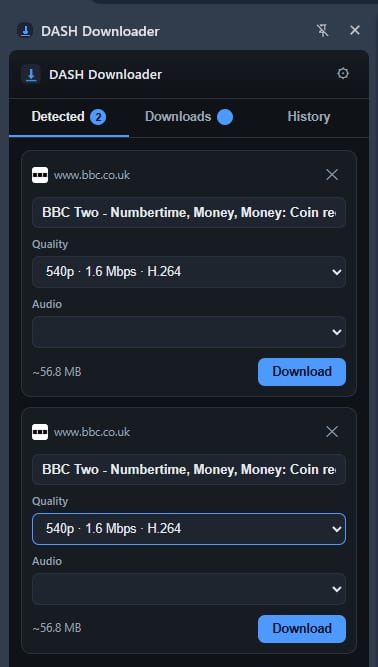
It is a Chrome extension I built to help download video files that are playing in your browser. It can detect DASH streams, HLS streams and normal video files such as MP4s, then lets you choose the version you want and save it properly to your computer.
I made it because a lot of video download tools either feel bloated, are full of adverts, want subscriptions for basic features, or make you install random software that you do not fully trust. I wanted something that sat inside Chrome, spotted the video stream, and gave you a clear option to download it.
The extension runs from Chrome’s side panel. Once you load a page and play a video, it checks for supported streams in the background. When it finds something, it shows it in a list and tells you whether it is DASH, HLS or a direct video file.
From there you can choose the quality, select an audio track where one is available, rename the file and download it.
For bigger files and segmented streams, it downloads multiple parts at once where possible, then puts the video and audio back together into a usable MP4 file. It does not re-encode the video, so it is not sitting there ruining the quality or taking forever to convert something that was already fine.
There are also settings for things like where files save, how many download connections it uses, retries if a segment fails and filename templates. I tried to make the settings useful without turning it into one of those programs where you need a degree just to understand the options.
I have also made the limits clear rather than pretending it can do everything.
It does not download DRM-protected content. Widevine, PlayReady and FairPlay streams are detected but cannot be downloaded through the extension. It also does not support live streams, subtitles, closed captions or every strange codec and container that exists out there.
It is made for downloading content you own, content you have permission to keep, or material that is openly available to download. People should still respect the sites they use and the people who made the content.
I am not some massive software company with a support team and a marketing department. I am just a dyslexic coder who builds things because I see a problem and think, “there has to be an easier way to do that.â€
TRDB Downloader is one of those projects.
You can find it, inspect the code, and install it yourself from GitHub:
The current version supports Chrome 116 or newer and is installed through Chrome’s Developer Mode using the “Load unpacked†option. Its main features include DASH, HLS and direct-file detection, quality selection, audio-track selection, download history and configurable saving behaviour.



Comments (0)
Be respectful — emails, phone numbers and profanity are filtered out.
No comments yet — be the first to share your thoughts.